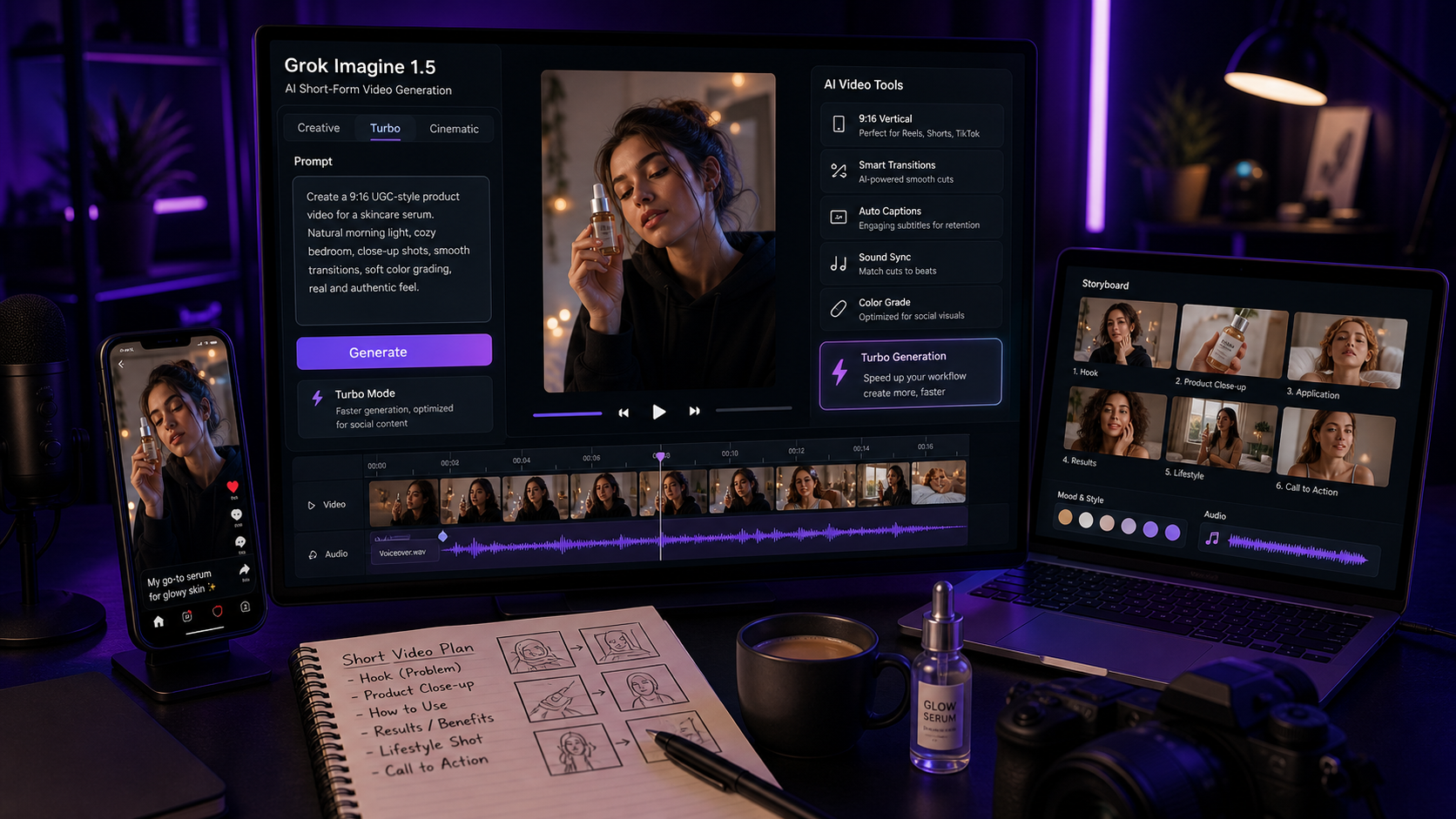
Grok Imagine 1.5 AI Video Generator searches are rising because creators and marketers want faster ways to turn campaign ideas into short-form video concepts. Grok Imagine 1.5 is best reviewed as a fast AI video creation option for quick social clips, concept testing, and image-driven video generation, with Chat4o AI as a useful place to follow model updates, compare AI tools, and build a practical creator workflow around prompt planning, video iteration, and social media production.
One caveat matters up front: xAI's current Grok Imagine Video 1.5 Preview docs describe image and video input/output support, but list text-to-video as not supported for that model page at the time of writing. So this review discusses text prompting as part of the broader Chat4o AI and creator workflow, while treating Grok Imagine 1.5 itself as a fast image/video-to-video style model unless official support changes.

Quick Summary: Grok Imagine 1.5 Video Creation
Grok Imagine 1.5 video creation is most interesting for creators who need rapid short-form video exploration rather than long, fully finished production. The model is positioned around fast visual generation, quick iterations, and creator-friendly video experiments, which makes it relevant for TikTok/Reels ads, UGC-style promotional clips, product demo concepts, and short cinematic sequences.
For marketers, the value is speed. A team can test multiple visual directions before handing the strongest version to an editor for captions, brand review, audio refinement, and final export. For social media managers, the value is iteration: generate a concept, inspect motion and framing, adjust the prompt, then test a cleaner variant.
Key takeaways
- Grok Imagine 1.5 is useful for fast short-form AI video ideation, especially when source images, visual references, or short clips are part of the workflow.
- Chat4o AI can be used as a broader AI video research and workflow hub for creators comparing model options and building social video prompts.
- Direct text-to-video should be described cautiously for Grok Imagine Video 1.5 Preview because current official docs do not list it as supported for that model page.
- Turbo-style speed can help concept testing, but it may trade off some visual fidelity, continuity, or detail control.
- Audio/video synchronization, subtitles, brand polish, and long-form continuity may still need manual editing.
- The strongest prompts describe scene, camera movement, visual style, audio direction, platform format, and CTA.

What Grok Imagine 1.5 Is and What It Can Do
Grok Imagine 1.5 is a video generation model family entry associated with xAI's Grok Imagine workflow, designed for fast AI video creation from visual inputs. Official model documentation for Grok Imagine Video 1.5 Preview describes support for image and video modalities, with text-to-video not listed as supported on that model page. That distinction matters for SEO articles and product reviews because "AI video generator Grok Imagine" can imply several workflows, but the current model-level capability should be described precisely.
In practical creator language, Grok Imagine 1.5 is best understood as a fast video concept engine. You can use it to test visual direction, motion, framing, social composition, short clips, and AI-generated video ideas before committing to full editing. It is not a one-click replacement for production editing, brand review, licensed music, subtitles, or ad compliance.
Useful capabilities to evaluate include:
- Fast iterations: Can you move from idea to short clip quickly enough for campaign testing?
- Short-form framing: Does the output work in 9:16 vertical formats for TikTok, Reels, and Shorts?
- Image/video references: Can the workflow preserve the subject, product, scene, or starting composition?
- Social concept testing: Can a product demo, UGC idea, or cinematic hook be tested before a full shoot?
- Optional audio workflow: If audio is generated or added elsewhere, does the timing feel close enough for manual refinement?
- Prompt responsiveness: Does the model respect camera direction, pacing, lighting, and CTA intent?
For creators and marketers, the best use is not "make the final ad instantly." The better use is "make a fast draft that tells me whether this creative direction is worth refining."

Fast AI Video Workflow on Chat4o AI
Chat4o AI is useful as the main workflow and research hub when creators want to explore AI video generation, compare model families, and plan prompt-driven short-form clips. Even if a dedicated Grok Imagine 1.5 workflow changes over time, Chat4o can support the creator side of the process: prompt planning, concept comparison, model research, and campaign-oriented AI video thinking.
A practical fast AI video workflow looks like this:
- Choose the content goal: TikTok ad, Reels product demo, UGC clip, cinematic teaser, tutorial, or concept test.
- Prepare a visual reference: Use a product image, scene image, storyboard frame, or short clip when the model supports visual inputs.
- Write a focused prompt: Describe one clear action, camera style, lighting, audio direction, format, and CTA.
- Generate a short draft: Keep the first attempt short so you can review motion, framing, and realism quickly.
- Review the weak points: Check subject consistency, visual artifacts, audio/video sync, subtitle space, and product readability.
- Revise the prompt: Remove extra scene changes, specify camera motion, and simplify the action.
- Finish manually: Add captions, licensed music, brand-safe copy, disclosures, and final edits.
This workflow is especially helpful for rapid AI video generation for social media campaigns. Instead of spending a full production cycle on an untested idea, marketers can prototype hooks, product angles, creator-style intros, and visual pacing first.
Chat4o's value is that it can become the planning layer around the video tool. Use it to write prompts, compare Grok Imagine with other AI models, and create structured test briefs before final editing.

Grok Imagine 1.5 vs Seedance 2.0 and Vidu Q3
Grok Imagine 1.5, Seedance 2.0, and Vidu Q3 should be compared by workflow fit, not by a single "best" label. Each tool can be useful for short-form creators, but the right choice depends on speed, prompt control, subject consistency, reference inputs, audio needs, and how much manual editing your team expects to do.
| Tool | Practical fit | Watch-outs |
|---|---|---|
| Grok Imagine 1.5 | Fast short-form concept generation, visual experimentation, campaign ideation, image/video-driven clips | Verify current model modality support, especially text-to-video and audio options |
| Seedance 2.0 | Product clips, UGC-style scenes, cinematic social videos, image-to-video animation, controlled prompt workflows | Results can vary with reference quality, duration, and motion complexity |
| Vidu Q3 | Cinematic AI video experiments, prompt-driven scenes, stylized clips, and model comparison workflows | Check current duration, resolution, prompt control, and audio support on the platform you use |
For TikTok/Reels ads, Grok Imagine 1.5 may be compelling when speed matters more than perfect polish. For product videos and UGC-style prompt templates, Seedance 2.0 is often a strong comparison point because many creator platforms publish practical Seedance workflows. For cinematic short sequences, Vidu Q3 may be worth testing when style and scene composition are important.
The best review method is simple: test the same short prompt across models. Use the same reference image if the workflow supports it, the same 9:16 format, the same scene, and the same audio direction. Then compare motion, subject consistency, speed, cost, prompt following, and editing effort.

Best Use Cases for Social Media and Marketing
Grok Imagine 1.5 is most useful for short, focused social video ideas where speed and iteration matter. It is not ideal for complex long-form storytelling with multiple locations, detailed continuity, and strict dialogue timing unless you are prepared to edit manually.
Best use cases include:
- TikTok and Reels ad concepts: Generate fast vertical ideas before committing to production.
- Product demo drafts: Show a product in use, test camera angles, and find a visual hook.
- UGC-style promotional clips: Prototype creator-style framing, problem-solution structures, and CTA timing.
- Short cinematic sequences: Explore mood, lighting, movement, and visual tone for a campaign.
- Ad prototyping: Test multiple hooks, product benefits, or CTA versions quickly.
- Storyboards: Turn an idea into a motion reference for editors, clients, or creative teams.
For a beauty brand, for example, a team might create a short clip showing a product close-up, hand motion, and a creator-style reaction. For a SaaS campaign, a team might generate a short concept using a laptop, clean desk, and voiceover direction, then replace fake UI with real screen capture in post-production. For a product seller, a short demo can help decide whether a creative angle is worth shooting with a human creator.
The common pattern is speed first, refinement second. Use AI video to test the shape of the idea, then use editing to make it publishable.

Prompt Formula and Copy-to-Use Examples
The best prompt formula for AI video prompt examples is compact but specific. A vague prompt such as "make a product ad" gives the model too much room to invent. A better prompt describes the scene, camera, style, audio, platform, and goal.
Use this reusable formula:
[scene/subject] + [camera movement/style] + [visual style] + [audio/dialogue direction] + [platform format] + [goal/CTA]
Copy these prompts and adapt the bracketed parts:
- Create a TikTok-style ad for [product] with dynamic camera movement, realistic creator-style narration, and synchronized subtitles.
- Generate a 9:16 social UGC clip for [brand] showing problem -> solution -> CTA in under 15 seconds.
- Produce a cinematic short story with two characters in [scene], natural dialogue, and smooth transitions.
- Generate a quick product demo video with energetic pacing, vertical framing, and creator-style aesthetic.
- Create a rapid concept-testing clip for [product/service] with AI-generated audio narration and realistic social media composition.
- Produce a talking-head explainer video about [topic] optimized for Reels, with natural lighting and AI voiceover.
- Generate a TikTok-style beauty tutorial showing [product] use with close-up shots and synchronized narration.
- Create a short cinematic clip with ambient audio, subtle motion graphics, and dynamic camera angles.
- Produce a social media ad concept for [brand] with fast cuts, vertical layout, and AI-enhanced storytelling.
- Generate a quick UGC-style video for [product] with realistic hand motion and creator-style framing.
For Grok Imagine 1.5 specifically, adapt these prompts to the current input mode. If the model workflow requires an image or video input, use the prompt as motion and style direction around that reference. If your platform provides separate text-to-video tools, use the same prompt there for comparison.

How to Optimize Prompts for Speed, Realism, and Audio Sync
Fast AI video creation works best when the prompt is narrow. The more actions, scene changes, characters, and camera moves you request, the more likely the result is to lose realism, continuity, or audio timing.
Use these prompt rules:
- Use one clear motion: "camera slowly pushes in on the product" is easier than "the creator enters, opens the product, demonstrates it, reacts, and walks away."
- Keep clips short: Fast concept testing is strongest in short bursts, especially for social hooks.
- Use a strong reference image: Product shape, scene composition, and subject consistency often improve when the visual input is clear.
- Specify camera behavior: Use "handheld phone-camera style," "slow push-in," "close-up," "overhead," or "cinematic pan."
- Reserve space for captions: Ask for clean top or bottom space if you plan to add subtitles.
- Describe audio carefully: Use "ambient sound," "subtle music," "creator narration," or "no dialogue" instead of vague audio requests.
- Check sync manually: Even if the model creates audio or narration, review timing before publishing.
- Avoid long continuity: For multiple scenes, generate separate clips and edit them together.
For marketers, the best loop is prompt, generate, review, simplify, regenerate. If the first result looks messy, the fix is often a shorter prompt with fewer moving parts, not a longer prompt with more instructions.

Cautions Before Publishing AI-Generated Video
Grok Imagine 1.5 and similar AI video tools can be useful, but the results should still be treated as drafts. AI-generated video quality may vary with prompt specificity, source image quality, model version, platform settings, and generation mode.
Watch these issues before publishing:
- Turbo-speed tradeoffs: Faster generation can compromise fine detail, visual fidelity, or consistency.
- Audio/video sync: Narration, mouth movement, subtitles, and sound cues may need manual alignment.
- Long-form continuity: Characters, objects, wardrobe, and lighting can drift across longer sequences.
- Product accuracy: Do not let the model invent product features, labels, ingredients, or claims.
- Ad claims: Avoid misleading before/after claims, fake testimonials, or unsupported performance claims.
- Rights and likeness: Do not generate copyrighted characters, celebrity likenesses, protected IP scenes, or brand assets you do not have rights to use.
- Disclosure and platform rules: Check ad platform policies, AI disclosure rules, sponsorship requirements, and music rights.
The safest workflow is to treat AI video as concept material until a human reviews it for brand safety, claims, legal rights, and technical quality.

FAQ: Grok Imagine 1.5 Video Creation
Is Grok Imagine 1.5 a text-to-video model?
Current xAI documentation for Grok Imagine Video 1.5 Preview lists image and video modalities and says text-to-video is not supported on that model page at the time of writing. Some platforms may provide broader text-to-video workflows, but do not assume that direct text-to-video is a confirmed Grok Imagine 1.5 capability unless the current platform page says so.
Is Grok Imagine 1.5 good for TikTok and Reels?
It can be useful for short-form concept testing, especially when the workflow supports vertical video previews, fast iterations, and reference-based generation. Final TikTok or Reels posts still need captions, rights checks, audio review, and platform-safe claims.
How does Grok Imagine compare with Seedance 2.0?
Grok Imagine 1.5 is interesting for fast short-form exploration, while Seedance 2.0 is often used in creator workflows for product clips, UGC-style prompts, and image-to-video animation. The best choice depends on prompt control, visual consistency, speed, cost, and platform settings.
Can I use Chat4o AI for Grok Imagine 1.5 workflows?
Chat4o AI is useful as a broader AI model and creator workflow resource. Use it to plan prompts, compare model updates, structure social video ideas, and follow AI video tool developments. Always verify the current generation model and capabilities on the platform page you use.
What prompts work best for fast AI video?
Short, visual prompts usually work best. Include subject, scene, camera movement, style, audio direction, platform format, and CTA. Avoid too many scenes, too much dialogue, and multiple unrelated actions in one clip.
Do AI-generated videos need manual editing?
Usually, yes. Manual editing is often needed for subtitles, sound timing, brand-safe copy, platform formatting, color polish, and claim review.

Conclusion: Is Grok Imagine 1.5 Useful for Fast AI Video Creation?
Grok Imagine 1.5 video creation is useful for creators and marketers who want fast short-form concept testing, social ad prototypes, UGC-style visual drafts, and cinematic idea exploration. Its biggest value is speed, but speed should be paired with careful prompt design and manual review.
For a practical workflow, use Chat4o AI to organize your AI video ideas, compare model options, and build better prompts before generating clips. Then test short prompts, review motion and audio timing, revise the weakest parts, and finish with human editing. That is the realistic path from AI-generated draft to publishable social video.
Related article
People also read
- AI Video Prompting Guides for Social Media Creators
- AI Creator Workflow and UGC Video Articles
- AI Marketing Visual and Ad Creative Insights
- AI Video Model Comparisons for Short-Form Creators
- AI Music and Video Content Workflow Guides
- AI Video Marketing and Creator Strategy Articles